Чтобы сгенерировать встроенный отчет Веб-представления, создайте экземпляр класса, который задает генератор отчетов (см., Создают Встроенный Генератор отчетов Веб-представления). Затем используйте fill и close методы генератора отчетов.
Например, предположите, что вы хотите создать отчет с помощью SystemDesignVariables пример класса (см. Файл Определения класса для Встроенного Веб-представления). Эти команды генерируют и отображают экземпляр того отчета:
model = 'f14';
rptName = sprintf('%sVariables', model);
load_system(model);
rpt = SystemDesignVariables(rptName, model);
fill(rpt);
close(rpt);
close_system(model);
rptview(rptName);
fill(rpt) команда использует fill метод, который генератор отчетов наследовал от своего базового класса. Этот метод встраивает Веб-представление f14 модель в отчете. Это также вызывает fillContent метод генератора отчетов, который заполняет панель отчетного документа отчетом о переменных, используемых f14 модель.
Вот часть получившегося Встроенного отчета Веб-представления:
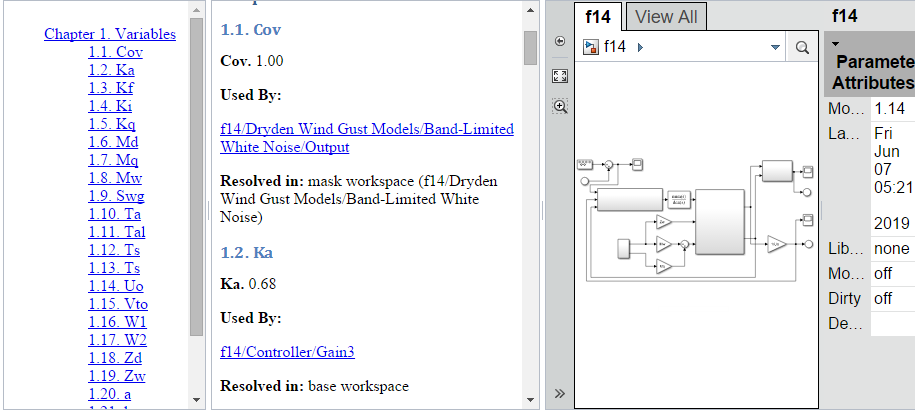
Для получения информации о навигации к различным частям отчета смотрите Навигацию по Встроенному Отчету Веб-представления.
Этот класс генерирует отчет для рабочей области и переменных словаря данных, используемых заданной моделью Simulink®.
classdef SystemDesignVariables < slreportgen.webview.EmbeddedWebViewDocument
    %SystemDesignVariables Report on variables used by a Simulink model
    %   Defines a class of report generators to produce HTML reports on
    %   the workspace and data dictionary variables used by a Simulink
    %   model. The generated report includes this information for
    %   each variable:
    %
    %   Value (if the value is a scalar, numeric value)
    %   Data Type
    %   Source (e.g, path of dictionary containing the variable)
    %   Source Type (e.g., data dictionary or base workspace)
    %   Users (path of blocks that use the variable)

    methods

        function rpt = SystemDesignVariables(reportPath, modelName)

            % Invoke the EmbeddedWebViewDocument constructor, which
            % saves the report path and model name for use by the
            % report's fill methods.
            rpt@slreportgen.webview.EmbeddedWebViewDocument(reportPath,...
                modelName);

            % Turn off duplicate link warnings to avoid warnings for
            % blocks that use multiple design variables.
            rpt.ValidateLinksAndAnchors = false;

            rpt.ExportOptions.IncludeMaskedSubsystems = true;
            rpt.ExportOptions.IncludeSimulinkLibraryLinks = true;
            rpt.ExportOptions.IncludeReferencedModels = true;
        end

        function fillContent(rpt)
            % Fill the Content hole in the report template with design
            % variable information. You can use DOM or Report API methods
            % to create, format, add, and append content to this report.

            %% Set up report
            % Allow use of unqualified names for DOM and Report objects,
            % such as Paragraph instead of mlreportgen.dom.Paragraph and
            % TitlePage instead of mlreportgen.report.TitlePage.
            import mlreportgen.dom.*
            import mlreportgen.report.*

            % Obtain model name, which was saved by the report
            % constructor. getExportedModels returns model names as a
            % cell array, in case a report uses multiple models.
            model = getExportModels(rpt);

            % Extract the model from the cell array. (This report uses
            % only one model.)
            model= model{1};

            % Add a title page to the report
            add(rpt, TitlePage("Title",[model " Report"],"Author",""));

            % Find variables used by the reported model
            finder = slreportgen.finder.ModelVariableFinder(model);

            % Create a Variables Chapter
            ch = Chapter("Variables");

            while hasNext(finder)
                result = next(finder);
                % Create a section for the variable
                s = Section(result.Name);

                % Add variable information to the section using
                % default reporter settings
                reporter = getReporter(result);
                add(s,reporter);

                % Add this section to the chapter
                add(ch,s);
            end

            % Add the chapter to the report
            add(rpt,ch);
        end
    end
end
Чтобы сгенерировать двухсторонние ссылки между пользовательскими путями к переменной проекта и блоками в Веб-представлении, которые используют переменные проекта, замените эти строки кода:
% Add variable information to the section using
% default reporter settings
reporter = getReporter(result);
add(s,reporter);
с этими строками кода:
% Create a Users list with links to the embedded model
usedByPara = Paragraph("Used By:");
usedByPara.Bold = true;
add(s, usedByPara);
users = result.Users;
nUsers = numel(users);
for u = 1:nUsers
    userLink = createElementTwoWayLink(rpt, ...
        users{u}, ...
        Paragraph(users{u}));
    add(s,userLink);
end
